

In this article, we explain where to find the official Mirakl API documentation and what information you will find in each technical API page.
- What API documentation is used for
- How to access it from Mirakl
- Official Mirakl resources
- How to search for a specific API
- What information an API page includes
- Before integrating via API
- Summary
Mirakl APIs allow you to automate processes between your system and the Marketplace platform.
You can use them to retrieve or update information related to offers, orders, documents, invoices or other processes available in the official documentation.
In Mirakl, you can access help from the help icon located at the top right of the screen.
- Log in to your seller account in Mirakl.
- Select the help icon at the top right.
- Use the search bar to find API-related documentation.
- Open the relevant result and review the technical information.
You can consult the official documentation through these resources:
- Mirakl Help Center: https://help.mirakl.com/
- Mirakl Developer Portal: https://developer.mirakl.com/
- Mirakl Marketplace Seller APIs: https://developer.mirakl.com/content/product/mmp/rest/seller/openapi3
If you need to locate a specific API, use the search bar in the Mirakl Help Center or Developer Portal.
- Access the Help Center or the Developer Portal.
- Enter the process you want to automate.
- Filter or review results related to Seller APIs.
- Open the relevant API and review the full documentation.
You can search for terms such as:
- Offers, to work with offers.
- Orders, to work with orders.
- Documents, to work with documents.
- Accounting, for accounting information available through API.
- Invoices, for invoice-related processes when available.
The information may vary depending on the API, but you will usually find:
- API code or name: technical identifier of the operation, such as orders, offers or documents.
- Description: explanation of what the API is used for.
- Call frequency: recommended usage and usage limits when defined.
- Endpoint: technical path used by the integration.
- Method: call type, such as GET, POST, PUT or DELETE.
- Pagination: how to browse results when the API returns many records.
- Parameters: filters or fields that can be sent in the request.
- Response fields: data structure returned by the API.
- Allowed values: accepted statuses, codes or enumerations.
- Examples or schemas: sample calls or response structures to support implementation.
- Technical notes: warnings about deprecated fields, localisation, permissions or recommended alternatives.
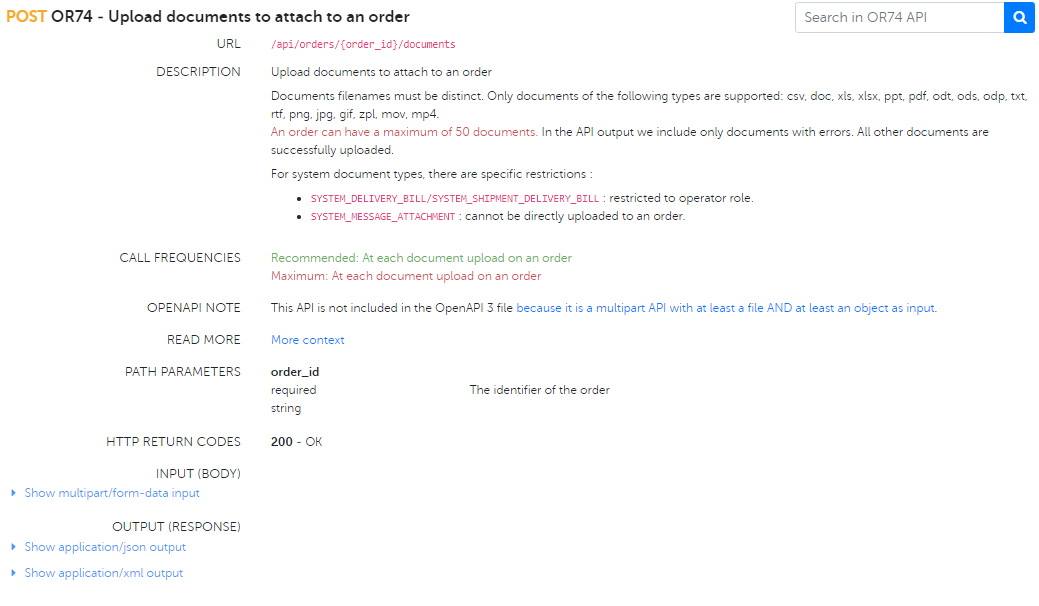
Example image: the API shown may not match the API you need to implement. Use it only as a visual reference of how technical documentation is displayed.
Before developing an integration, review these points:
- Objective: define which process you want to automate.
- Permissions: check that your user or integration has access to the required information.
- Credentials: manage keys or access tokens securely.
- Environment: confirm whether you are working in test or production.
- Volume: check whether the API recommends asynchronous exports for large data volumes.
- Errors: prepare proper error handling, retries and logs.
- Mirakl help is located at the top right: access it from the platform’s help icon.
- Always use official documentation: Help Center, Developer Portal and Seller APIs index.
- Each API may include different technical information: endpoint, method, frequency, parameters, pagination, responses and examples.
- You need technical support: APIs require development, testing and secure credential management.
- Avoid using a specific API as a general index: always search in the Seller APIs index or official search tool.