

This article explains the most common errors that may appear after syncing your catalog.
Remember to download the error report.
For more information, visit this article:
Where to check the errors?
Once you access the status of your imports, you can check the errors in the last columns of the report.
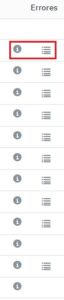 |
Hover over the "i" info icon to see if there are any errors.
- If there are, click the document-shaped icon to its right.
- This will download a file containing detailed error information.
How to read the file?
The downloaded file provides error information in the last two columns:
- "error-line": indicates the row number where the error occurred, so you can locate the offer easily.
- "error-message": shows the error message detected by the platform.
Most common errors and their causes
Here are the most common ones:
| Error | Reason |
| The product does not exist. | The product identifier doesn't match our database. The code may be mistyped, or the product might not exist in our catalog. |
| The price field is mandatory. | The price field is empty. It is required. |
| The sku field is duplicated in the source file. | There are duplicate SKUs on different rows. Each row must have a unique SKU. |
| The product-id field is mandatory when product-id-type is filled. | You selected a product ID type but didn't fill in the "product-id" field. Both are required. |
| The state of the product is unknown. | The product condition is missing. You must specify if it is new or refurbished (choose one of the three options). For more info, click here. |
| The product linked to the new offer is different from the product linked to the existing offer. | You are trying to link a new offer to the same SKU as a previous one but with a different product (e.g., different EAN). Usually, this is due to a mistake with the SKU or EAN. |
| The product linked to the new offer is different from the product linked to an old offer which has the same shop id. | This is a similar error, but in this case, the previous offer was created by the same store. Check the "offer SKU" and "EAN" fields to avoid inconsistencies. |
| The discount_price must be between the minimum and maximum limits of the platform. | The discount price doesn't meet the allowed minimum or maximum values (e.g., 0). If you're not applying a discount, leave the field empty. |
| Important: If your catalog is not syncing correctly, we recommend checking the errors first before contacting us. In many cases, you can solve them on your own and speed up the process. |